
Sep 24, 2026
How to Advertise on ChatGPT: Step-by-Step from Access to Launch
Summary:
ChatGPT advertising is a paid channel distinct from organic AI visibility, requiring eligibility approval and access to an ad account.
Ad formats are contextual and native to the conversation, not keyword-based like traditional search ads.
Minimum spend thresholds and self-serve access remain restricted; not every advertiser qualifies today.
You can buy that inventory through OpenAI's Ads Manager or through GetMint Ads Studio, which sits on the same ad platform but starts campaigns from the prompts you already track organically.
This guide walks you through every step, from account access to campaign launch.
OpenAI began integrating sponsored placements into ChatGPT in 2025, giving brands a direct channel into one of the most active AI interfaces in the world. The stakes are real: users arrive at ChatGPT mid-decision, with high research intent and no competing search results to distract them. For marketing teams already tracking organic AI visibility, the question of how to advertise on ChatGPT through a paid ad placement is a logical next step. This guide covers eligibility requirements, the setup process in both OpenAI's Ads Manager and GetMint Ads Studio, targeting options, budget considerations, and what a live campaign actually looks like.
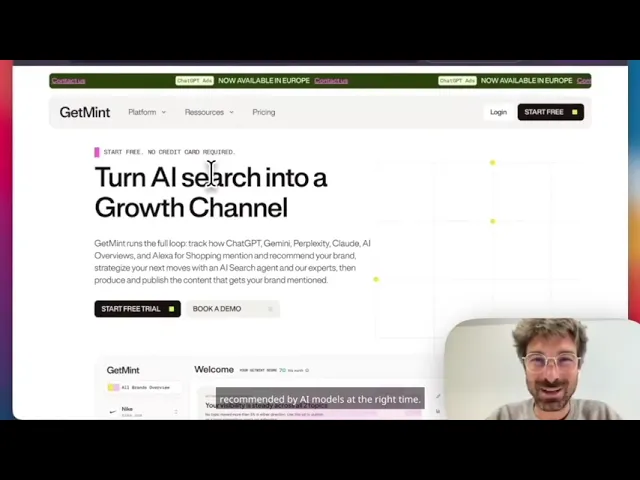
Joan Burkovic (GetMint CEO) walks through building and publishing a ChatGPT campaign in Ads Studio, from picking a prompt to reviewing the draft creative.
What Is ChatGPT Advertising, and How Does It Work?
ChatGPT advertising is a paid placement system that allows eligible brands to appear within ChatGPT conversations as sponsored content, visually separated from the model's organic output. Unlike traditional search ads triggered by keywords, ChatGPT ads operate on contextual signals derived from the conversation itself. OpenAI refers to these as context hints: inferred topic areas that determine when a sponsored ad placement is relevant, without exposing the user's exact prompt to the advertiser.
The distinction from organic AI responses matters enormously. When ChatGPT recommends a product, service, or brand without any commercial arrangement, that recommendation emerges from the model's training data, retrieval sources, and reasoning process. A paid placement, by contrast, is a discrete unit of sponsored content that appears alongside or within the conversation flow, clearly labeled as an advertisement. The IAB Native Advertising Playbook 2.0 identifies disclosure, design, and location as the primary factors that distinguish native ad formats from editorial content. ChatGPT ads follow that same logic: the "Ad" or "Sponsored" label is non-negotiable.
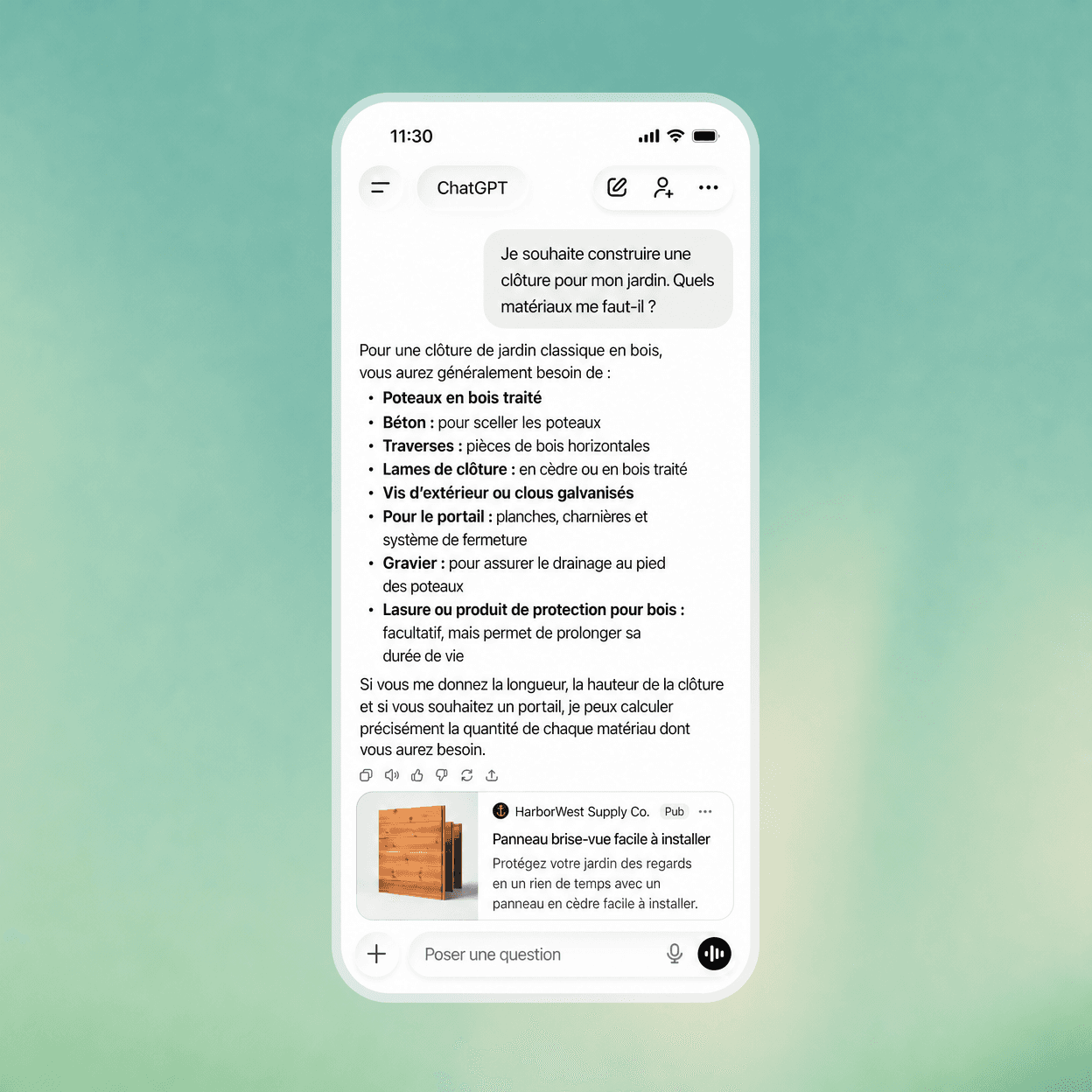
How does this differ from running a campaign on Google Ads or Meta? Three structural differences stand out:
Targeting mechanism: ChatGPT uses context hints rather than keyword bidding or behavioral audience segments built from browsing history.
User intent stage: ChatGPT users are typically in a research or decision phase, not a browse phase, which shifts the value of impressions relative to CPM or CPC benchmarks on social platforms.
Creative format: Ad creative in ChatGPT is native to the conversational interface. There are no banner units, no video pre-rolls, and no carousel formats. The placement is text-forward and integrated into the response environment; think static ads woven into a dialogue rather than display units competing for peripheral attention.
For marketing teams already managing organic AI visibility, paid ChatGPT placements represent a separate, parallel channel. One does not substitute for the other, and the strategies that drive organic citation share don't automatically translate into paid campaign performance. They do, however, inform each other, and where you run the campaigns determines how easily that happens. More on that below.
Step 1: Choose Where You'll Build the Campaign
Once your ad account is approved, you have two places to work.
Option A: OpenAI Ads Manager
You'll receive an email containing your advertiser account credentials and a direct link to the self-serve platform. The login page for the OpenAI ad manager sits within OpenAI's broader account infrastructure, so if you already hold a ChatGPT or API account, expect a familiar authentication flow: email, password, and optional two-factor verification.
After logging in for the first time, the dashboard presents a structured workspace built around three primary navigation areas:
Campaigns: where you create, pause, and monitor individual advertising campaigns, each containing its own ad groups, creative assets, and targeting parameters.
Billing and Spend: where you connect a payment method, set a budget cap, and review your running expenditure against committed spend.
Performance: where impression counts, CPM or CPC data, and cost-per-conversion tracking aggregate into a reporting view you can filter by date range or campaign objective.
The interface is self-serve in design, though it retains guardrails that distinguish it from fully open platforms. You won't find a free-form keyword planner here. Targeting operates through context hints, so the audience configuration panel looks different from what most search or social advertisers are accustomed to.
Before you can launch any campaign, you must complete two account-level steps. First, connect a valid payment method and confirm your billing address matches the registered business entity from your application. Second, complete the advertiser account verification step, which may involve uploading a business registration document depending on your market. ASA and CMA guidance on advertising disclosure signals the regulatory direction that platforms like OpenAI are responding to, and that verification step reflects exactly this compliance pressure.
Option B: GetMint Ads Studio
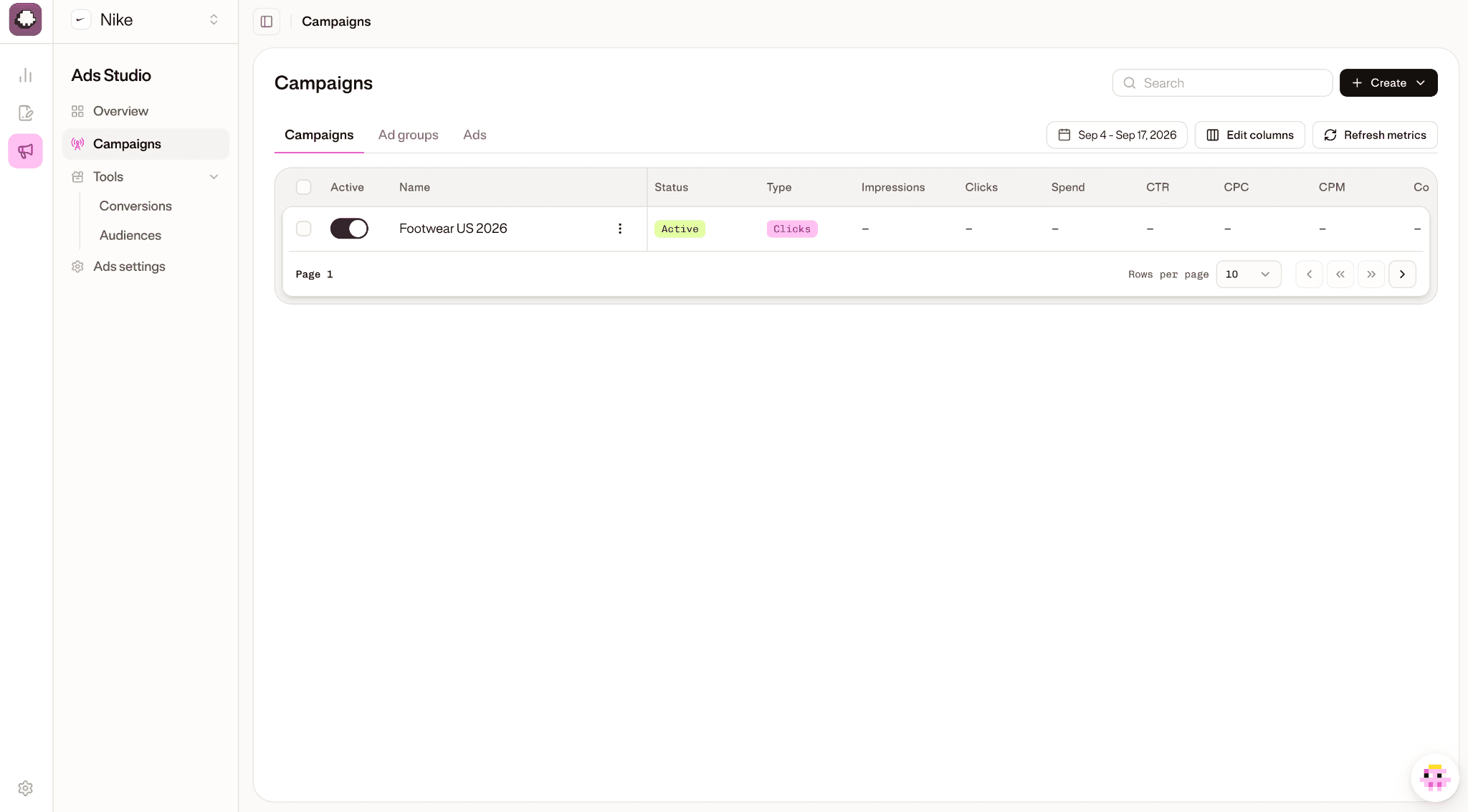
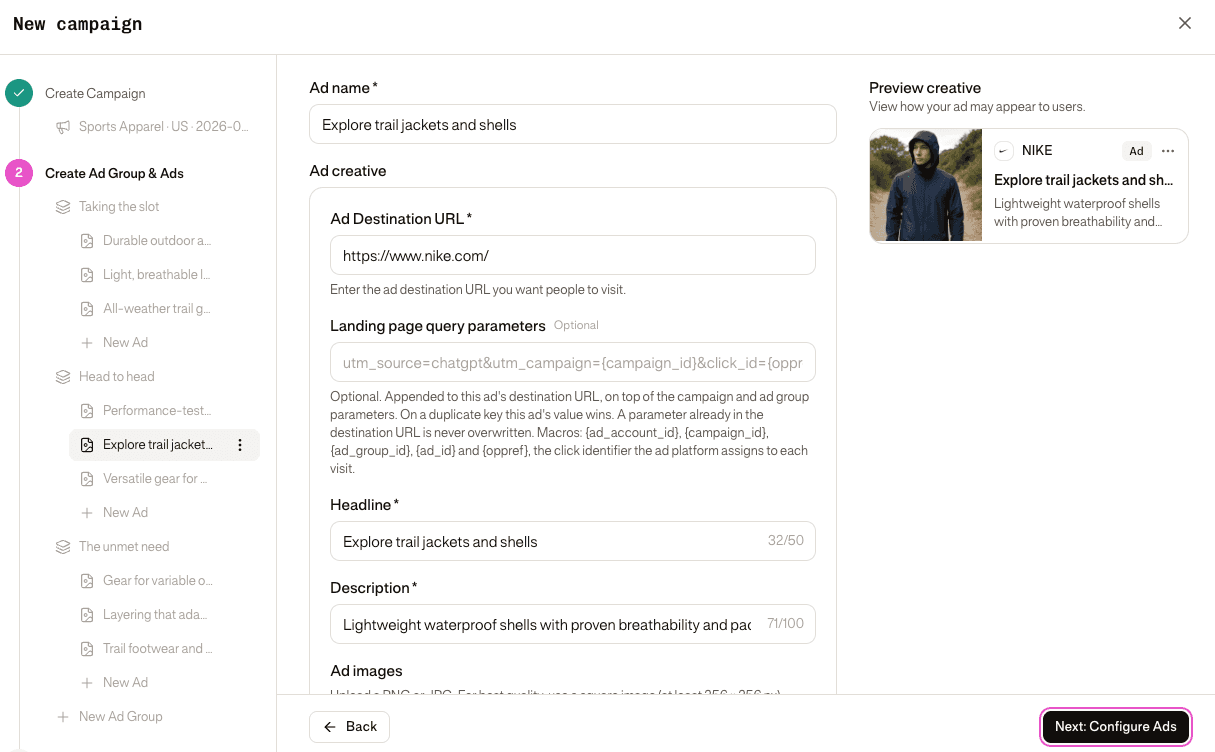
Ads Studio publishes to the same ChatGPT ad platform and produces the same campaign objects. What changes is where the campaign starts. In OpenAI's manager, you start with an empty campaign and describe your context hints from scratch. In Ads Studio, you start from a prompt you already track, and the campaign is drafted before you ever see it: named, targeted, and written from your brand's own context and the sponsored placements already observed on that prompt. Everything is editable. It's a first draft, not a commitment.
It's a separate workspace inside GetMint, reachable from the app switcher in either sidebar, and access follows your role in the organization. Viewers can read every screen; creating and editing campaigns requires edit rights.
The practical consequence, for anyone already tracking organic AI visibility, is that the strategy work and the buying work stop living in two different tools. We cover what that changes further down.
Step 2: Choose Your Ad Format and Set Up Targeting
With your ad account configured, the next decision is format selection. OpenAI currently offers three placement types within the ChatGPT interface, each suited to different campaign objectives.
Sponsored answers appear as labeled responses integrated into the conversation flow. When a user's query aligns with your context hints, ChatGPT surfaces a clearly disclosed sponsored unit alongside its organic output. These placements carry a "Sponsored" label, maintaining the disclosure standards that the IAB's native advertising taxonomy has long recommended for in-feed formats.
Conversation ads function as interstitial placements between conversational turns, appearing as distinct cards rather than woven text. They're better suited to brand awareness objectives than direct conversion, given their visual separation from the model's response.
Display placements occupy the sidebar or below-response zones, closer to traditional banner inventory. These carry lower contextual relevance but offer higher impression volume, making them a reasonable fit for reach-focused campaigns or product ads that benefit from visual creative.
Targeting works without keywords
This is the sharpest departure from paid search logic. Instead of bidding on terms, you configure context hints: topic categories and intent signals that OpenAI's system matches against live conversation content. You're not selecting audiences based on demographic profiles or browsing history in the traditional sense. The system infers research-stage intent from the conversation itself, then matches eligible inventory accordingly.
Here's what you can configure within the targeting panel:
Context categories: broad topic areas (finance, travel, software, health) that define where your ads are eligible to appear
Audience signals: aggregated behavioral segments OpenAI makes available, without individual-level profiling
Geographic targeting: country or region-level controls
Frequency caps: limits on how often a single user sees your creative within a defined window
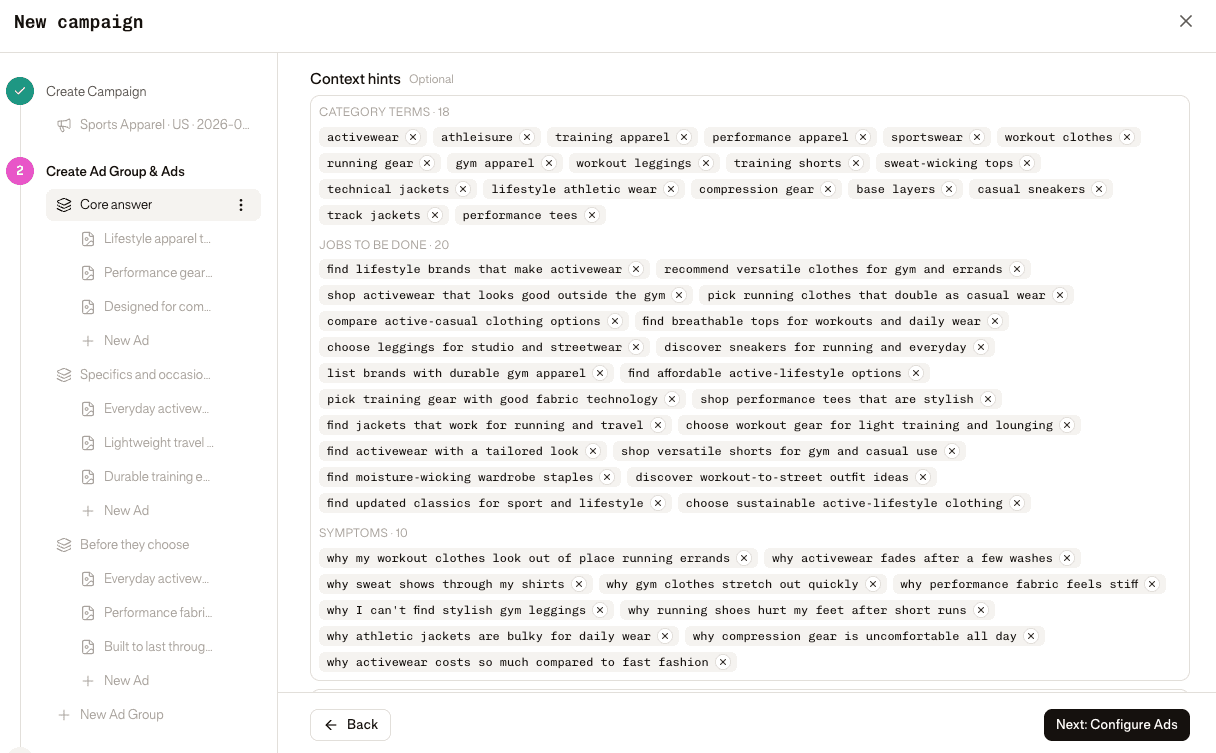
What you cannot configure: individual keyword triggers, specific competitor contexts, retargeting based on prior ChatGPT sessions, or demographic filters beyond broad geographic parameters. The system prioritizes contextual relevance over granular audience control, which changes how you should think about ad creative. Your creative carries more targeting weight here than in search, because the message itself must qualify the audience.
This is also the step where a blank targeting panel costs you the most. Context hints are the campaign's entire aim, and there's no keyword planner to check your work against. Building them from intuition is how budget ends up matched to the wrong conversational moments. In Ads Studio, the hints arrive prefilled and suggested, derived from the prompt and topic the campaign was started from, and locations are derived from that topic's market. You're editing a proposal rather than guessing at one.
Step 3: Review Costs, Set Your Budget, and Launch
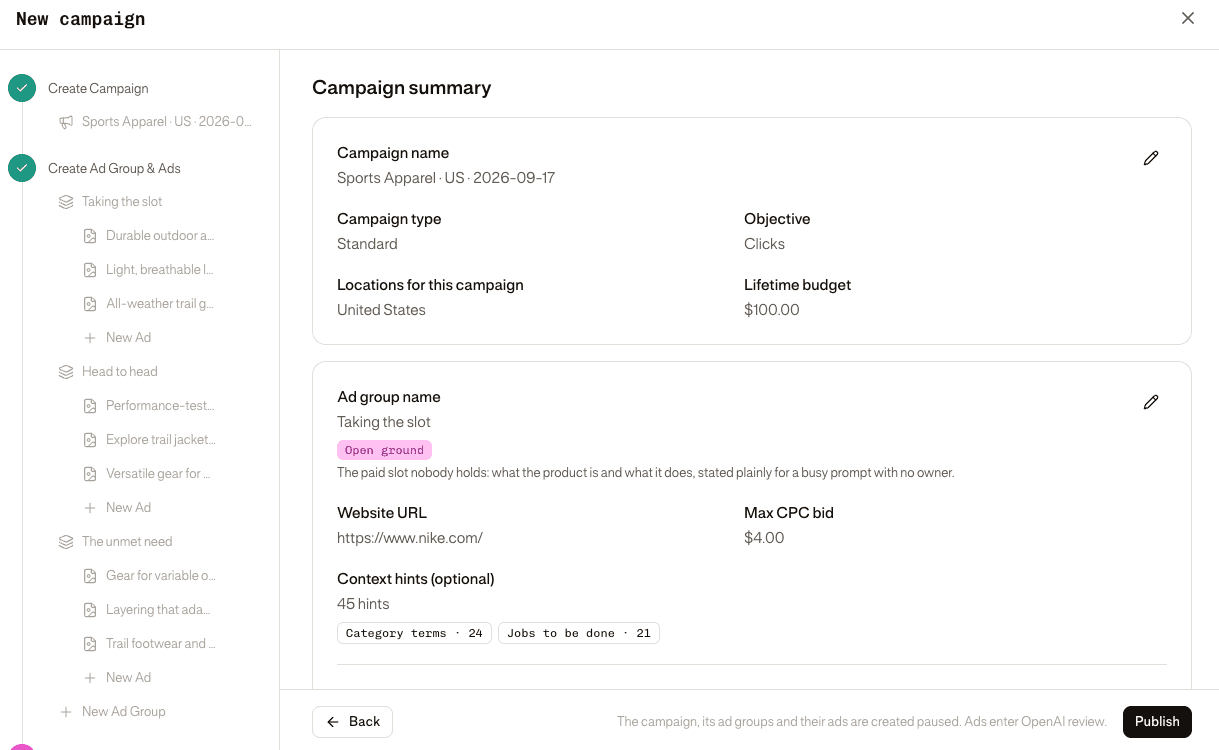
Pricing on the OpenAI advertising platform is not publicly fixed. Costs vary based on your access tier, campaign objective, and the competitiveness of the contextual inventory you're targeting. OpenAI has not published a universal rate card, so expect your account manager to present spend thresholds during the onboarding process rather than discovering them through a self-serve interface. What's consistent across early advertiser reports is that minimum spend requirements are meaningful: this is not a channel where a modest daily budget gets you live.
The pricing model draws on both CPM and CPC structures depending on your campaign objective selection. Awareness-oriented campaigns tend toward impression-based billing; conversion-focused campaigns lean toward cost per click or cost per conversion metrics. Your max bid and budget cap are set at the campaign level, and spend is tracked in real time against the cap you configure.
Billing setup follows a standard managed-media workflow. You'll connect a payment method (typically a credit card or invoiced billing for larger accounts), set a campaign-level budget cap, and confirm your billing contact before any creative goes live.
Before you hit launch, run through this pre-launch checklist:
Tracking verified: Confirm your conversion tracking pixel or API-based attribution is firing correctly in a test environment.
Creative assets approved: All ad creative must pass OpenAI's policy review; sponsored content labels must be visible and compliant with FTC truth-in-advertising standards.
Targeting reviewed: Confirm your context hints map accurately to your campaign objective and intended audience.
Compliance confirmed: Restricted categories, prohibited claims, and disclosure requirements are cleared.
Budget cap set: Verify your spend cap is active to prevent unintended overdelivery on launch day.
Once every item is checked, submit your campaign for final review. OpenAI typically completes this review before impressions begin serving.
Don't skip the tracking suffix
The single most common reason a ChatGPT campaign looks unattributable in analytics is that nobody configured the landing page query parameters. Each ad has one destination URL, and what actually opens on a click is that URL plus a query-parameter template: the tracking suffix your analytics reads, along the lines of utm_source=chatgpt&utm_campaign={campaign_id}&click_id={oppref}.
In Ads Studio that template can be set at three levels, and the levels merge rather than override wholesale. Every parameter from every level lands on the URL; when the same key is set twice, the most specific level wins.
Level | Applies to | Beaten by |
Campaign | Every ad in the campaign | Ad group, ad |
Ad group | Every ad in the group | Ad |
Ad | This ad only | Nothing |
A parameter already written into the ad's destination URL is never overwritten by any level. So the working pattern is to put the parameters every ad shares at campaign level (source, medium, campaign ID) and reach for the lower levels only to add something narrower, like a utm_term per ad group or a utm_content per creative.
Placeholders such as {campaign_id}, {ad_group_id}, {ad_id} and {oppref} are replaced with live values when the URL is built. {oppref} is the one to watch: it's the click identifier the platform assigns to each visit, and it's what links a conversion back to the click that caused it. If you optimize toward conversions, carry it through to whatever records them.
ChatGPT Advertising vs Organic AI Visibility: What's the Difference?
Paid placements and organic mentions in ChatGPT are fundamentally different mechanisms, and confusing them leads to misallocated budget. Understanding both paths is essential before committing spend to either.
Organic AI visibility refers to how often ChatGPT cites or recommends your brand without any paid arrangement. The model draws on its training data and, where enabled, real-time retrieval to surface brands it considers authoritative and relevant. Your content quality, the frequency with which credible sources reference your brand, and the strength of your domain's editorial footprint all influence whether ChatGPT mentions you unprompted. This is the territory that Generative Engine Optimization (GEO) addresses: building the signals that make a model treat your brand as a reliable answer.
Paid ChatGPT advertising, by contrast, guarantees placement. Eligible advertisers can purchase sponsored impressions that appear within conversations regardless of whether the model would organically reference their brand. The ad carries a disclosure label, and it does not alter the model's underlying response logic.
Dimension | Organic AI visibility | Paid ChatGPT ads |
Trigger | Model's training and retrieval signals | Advertiser budget and contextual targeting |
Cost structure | No direct media spend | CPM or CPC-based, subject to minimum spend |
Disclosure | None required | Mandatory sponsored label |
Control over placement | Indirect, through content and authority signals | Direct, via campaign objective and budget cap |
Speed to appear | Weeks to months | Days, post-approval |
Influence on AI response | None; guardrails prevent advertiser manipulation | None; ad is separate from the model's answer |
A critical guardrail worth stating plainly: neither path lets you dictate what ChatGPT says. Paid ads sit adjacent to the conversation; they don't rewrite it. Organic mentions depend on signals the model weighs independently. The EU AI Act's transparency obligations reinforce this separation, requiring that AI-generated content and commercial placements remain clearly distinguishable.
For brands with strong existing content authority, organic GEO investment often delivers compounding returns over time. Paid advertising makes more sense when you need immediate brand visibility, are entering a new market, or are targeting high-intent research-stage queries where your organic footprint is thin.
Running Organic and Paid AI Search in One Platform
Two different mechanisms do not require two different workflows, and this is where most teams lose time. The hard part of a ChatGPT campaign isn't the mechanics of building it. It's deciding which conversational moments are worth paying for. That decision is an organic question answered with organic data: which prompts already name you, which name a competitor instead, and which nobody owns yet. Buy a position you already hold organically and you've spent money to stand still. Skip a prompt where a rival is the only named option and you've left the answer to them.
Run those two things in separate tools and the strategy sits in one system while the budget sits in another, reconciled by hand in a spreadsheet. GetMint Ads Studio exists to close that gap: organic visibility tracking and paid campaign buying in the same platform, on the same set of prompts.
Campaigns start from a prompt, not a keyword. The prompts you already track for visibility are the buying unit. Pick one and the campaign opens already knowing what it's for, with the prompt and its competitive position carried across.
Context hints are prefilled and suggested. They're derived from the prompt and topic the campaign started from, and campaign locations are derived from that topic's market, rather than assembled from scratch in an empty panel.
Creative is produced in the platform. The wizard drafts headline, description, image and destination for each ad from your brand's own context and the sponsored placements already seen on that prompt. OpenAI's Ads Manager expects you to arrive with finished creative; Ads Studio generates a first version you then edit. For teams without a standing creative pipeline, this is often the difference between launching this week and launching next quarter.
Common Mistakes to Avoid and Tips for Your First Campaign
The most persistent error advertisers make when first running ads on ChatGPT is importing search-ad logic wholesale. Keyword-based campaign structure doesn't translate here. ChatGPT's inventory operates on context hints and conversational intent, not discrete query strings. Building tightly themed ad groups around keywords will produce misaligned placements and poor performance metrics. Reframe your targeting around user intent states: research, comparison, and decision. That mental shift changes how you write creative, select objectives, and interpret results.
Policy violations are the second major friction point. OpenAI's ad restrictions cover prohibited categories, claim substantiation, and disclosure requirements. Ads that make unverified performance claims, target sensitive topics, or fail to carry visible sponsorship labels get flagged before they reach the audience. The FTC's enforcement framework for native advertising makes clear that disclosures must be prominent and unambiguous, not buried in fine print. OpenAI's own compliance review applies similar standards. Review your ad creative against both sets of requirements before submission, not after rejection.
Buying blind is the third, and the most expensive. Launching a campaign without knowing your organic position on the same prompts means you can't tell whether a placement is defending ground you already hold or taking ground you don't. Establish the organic baseline before the budget goes live, whichever tool you buy through.
For the first seven days post-launch, treat the campaign as a measurement exercise rather than a performance exercise. Early impressions data tells you whether your context hints are matching the right conversational moments. CPM and frequency signals indicate whether your budget cap is constraining delivery. Conversion tracking, if configured at launch, will show whether traffic from ChatGPT ad placements behaves differently than traffic from other paid channels.
A few practical principles to carry into that first week:
Don't adjust bids or creative before you have statistically meaningful impression volume.
Check placement context reports daily; mismatched contexts signal a targeting problem, not a creative problem.
Flag any compliance review delays immediately with your account contact to avoid losing campaign momentum.
Patience and diagnostic discipline in the first week will produce better second-week decisions than any premature optimization.
Frequently Asked Questions About Advertising on ChatGPT
How do I promote a product in ChatGPT if I don't have access to paid placements yet?
Organic AI visibility is the most accessible route. Brands that appear consistently in ChatGPT responses earn that presence through high-authority content, strong citation profiles, and structured data that models can parse reliably. This is the domain of Generative Engine Optimization (GEO): publishing content that answers the specific prompts your target audience submits, distributed across sources that LLMs treat as credible. Paid placements and organic mentions are complementary, not interchangeable. If your advertiser account application is still pending, investing in organic visibility is not a fallback; it's a parallel strategy with durable returns, and the prompt-level data it produces is exactly what you'll use to target the paid campaigns later.
Do I have to use OpenAI's Ads Manager to run ChatGPT ads?
No. The ad account and its review are OpenAI's, but the interface you build campaigns in doesn't have to be. GetMint Ads Studio publishes to the same ad platform, and creates the same campaigns, ad groups and ads. The difference is the starting point: campaigns begin from a prompt you already track rather than an empty targeting panel, context hints arrive prefilled, and creative is drafted in the platform rather than brought to it.
How much revenue does ChatGPT currently generate from advertising?
OpenAI has not published advertising-specific revenue figures. The platform's monetization through ads is still in an early, controlled phase, with inventory access limited to approved partners. Any figure circulating in the press is either an estimate or a projection, not a disclosed number. We'd caution against treating third-party estimates as benchmarks for your own campaign planning.
Can ChatGPT generate ad copy or creative for my campaigns?
Yes, and this is worth separating clearly from advertising inside ChatGPT. Using ChatGPT as a creative tool to draft ad copy is a distinct use case from running sponsored placements within the interface. Research presented at WWW 2024 found that LLM-generated personalized ad creative can match or exceed human-written copy on engagement metrics in controlled conditions. That said, any AI-generated persuasive content carries disclosure obligations. Regulatory guidance increasingly requires that audiences can identify the commercial and automated nature of content they receive. Using ChatGPT to produce your creative is a legitimate efficiency; just ensure your compliance and legal teams review output before it reaches audiences.
Your Next Steps to Start Advertising on ChatGPT
Advertising on ChatGPT rewards preparation. Eligibility, budget thresholds, contextual targeting, and policy compliance each require deliberate attention before you spend a dollar. The brands that will extract measurable value from this channel are those that pair paid placements with strong organic AI visibility, not those that treat one as a substitute for the other.
Your immediate priority: audit your current citation rate inside AI models, then apply for advertiser access in parallel. Both tracks compound, and running them in one platform means the first one tells you where to spend on the second.
The question isn't whether to advertise on ChatGPT. It's whether your brand is visible enough to make that spend defensible.
START FREE. NO CREDIT CARD REQUIRED.
Your competitors are already visible in AI. Are you?
See what ChatGPT, Gemini and Perplexity say about your brand. Set up in 5 minutes.

